User guide
Horses
Each horse gets a page: its photo and name, today's blanket, its rides and its documents. The Horse tab opens on one horse; Your horses at the top switches between them.
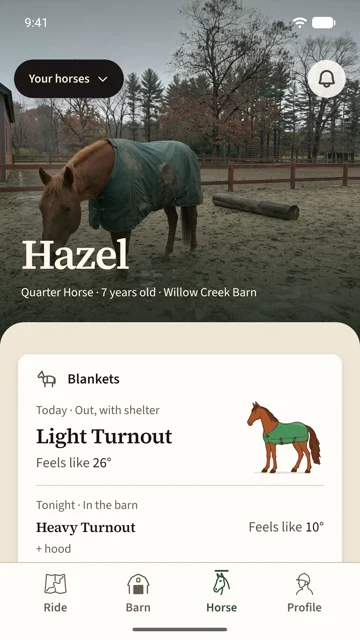
Add a horse
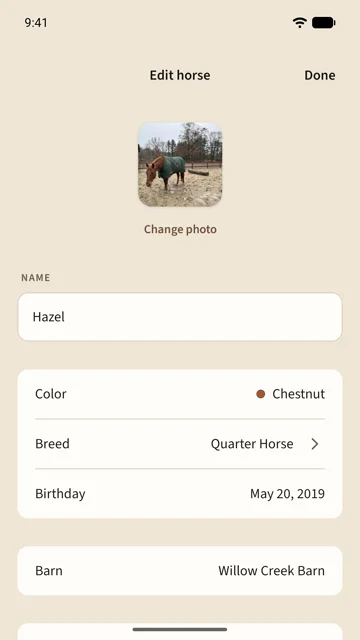
Tap Your horses, then Add horse. The name is the only thing it needs. Colour, breed, birthday and a barn can come later, and a photo makes the page.
Edit a horse
Your horses › Edit horse opens everything on one page. Tap a row to change it; each change saves as you make it, so there is no save button.
- Birthday gives the page the horse's age, and the blanket setup reads it too.
- Barn puts the horse in one of your barns, or takes it out. Moving a horse changes who can see it.
- Archive horse at the end takes the horse off your list.
Rides on this horse
The Rides row opens every ride tagged with this horse. Tag a ride from the ride's own page: open Horse under Details and pick from your horses and your barns'. The ride then names the horse in your ride log.
Who can see a horse
- A horse with no barn is yours alone.
- A horse at a barn is visible to that barn's members, with its name, photo and facts. They see it on your member page and on the barn's horse lists.
- Only you edit, archive, or read the horse's documents and blankets. Members see the blanket pick, not the chart behind it.