User guide
Events
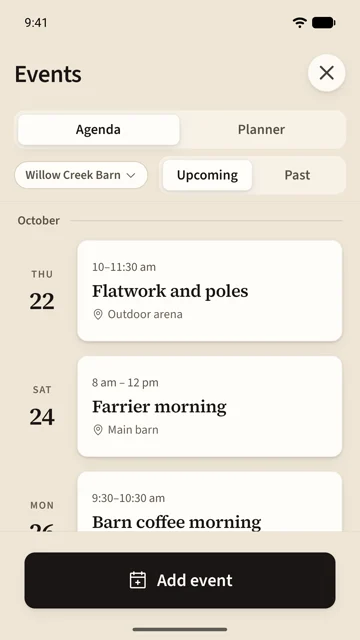
Events are the barn's calendar: lessons, the farrier, a coffee morning, a trail ride with a live map. Open them from Events on the Barn tab.
On this page
Read the calendar
Agenda lists what is coming, day by day. Past keeps the last 90 days. If you are in more than one barn, the chip under the tabs picks which calendar you are reading.
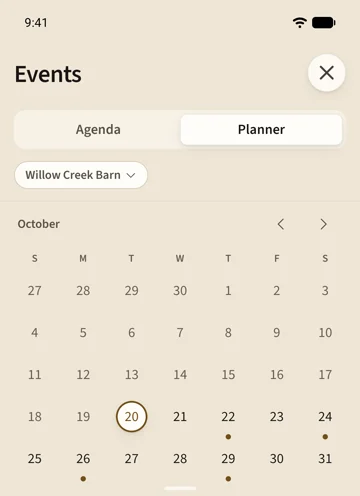
Planner is the month. A dot marks a day with something on; tap a day to see it below, and the button at the foot adds an event on that day.
Add an event
- Tap Add event.
- Give it a name. The date and times are filled in for you; change them if they are wrong.
- Choose the calendar it goes on, a meetup place, and a route if it is a ride.
- Add a cover photo and a few lines about it if you like, then tap Add.
The event appears on the barn's calendar at once and reaches everyone's phone as a notification.
Open an event
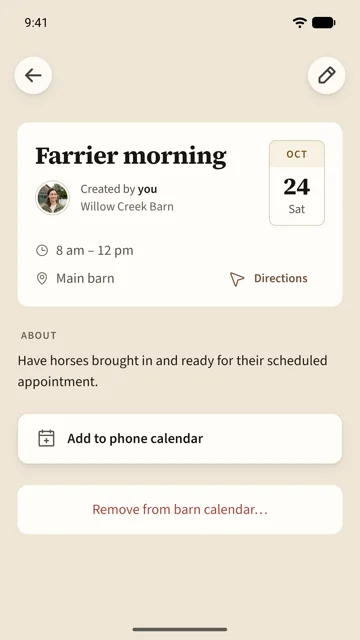
An event's page shows who created it, the day and time, the meetup place with Directions, and what it is about. Add to phone calendar puts it on your own calendar.
The creator can edit it with the pencil until it starts. Remove from barn calendar takes it off the barn without deleting it.
Invite people
Share invite on an event sends a link. Friends with Saddle open the event; friends without it see the event on the web, with the time in the event's own time zone and an Add to calendar button.
An event from outside your barns can be kept with Save event, so it stays in your calendar and works offline.
Ride an event together
An event with a route gets a live map, open from 15 minutes before the start until an hour after the end.
- Tap Join ride to land on the Ride tab with the route drawn and the other riders on the map.
- Start ride records as usual. If you would rather ride without showing your position, switch to Hidden first; you still count as riding.
- Watch live map lets you follow along without riding.
- Follow route rides the route on your own, with nobody watching.
Only people who joined the ride see the live map. Your position leaves the map the moment you stop or leave.
Post your ride
When an event ride finishes, Saddle offers Post to event. A review shows what others will see; Trim cuts the start and end first if you want to. Keep private leaves the ride yours. You can post or take it back later from the ride's ⋯ menu.
Once the ride is over, the event shows every posted ride drawn over the route, with a replay of everyone moving across the map together, and each rider's time at every waypoint. It is a group ride, not a race: nobody is ranked.