User guide
Blankets
Saddle reads the forecast where your horse lives, works out how cold it feels for that horse, and says which blanket goes on now and tonight. You set up once; after that the answer is on the horse's page every day.
Read today's pick
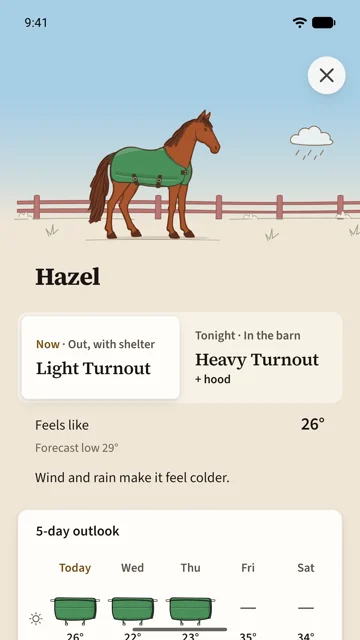
The Blankets home opens from the card on the horse's page.
- The two seats are the current period and the next: Now · Out, with shelter and Tonight · In the barn, each with its blanket and any extra, such as a hood.
- Feels like is the number the pick was made from: the forecast low, adjusted for the horse's coat and for wind and rain. The forecast low sits under it, and one line says what moved it.
- The 5-day outlook shows each day's and night's pick. Tap it for the chart of felt lows and every period's reasoning.
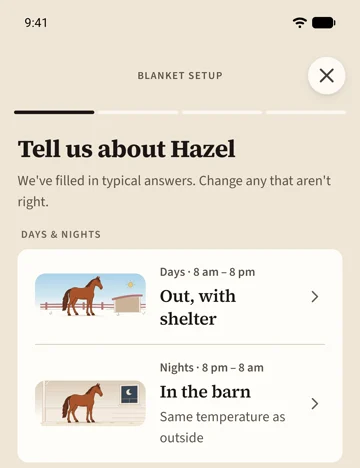
Set up a horse
The first time, the Blankets card offers setup. It asks where the horse spends days and nights, how it is clipped, its coat, whether it is an easy or hard keeper and whether it runs hot or cold. Typical answers are filled in; change the ones that are wrong, or tap Use the suggestions for everything.
Setup then suggests a set of blankets and a chart for them, which you can accept or draw yourself. You can run it again any time from the Blanketing profile, and it shows you every line it would move before it moves anything.
The chart
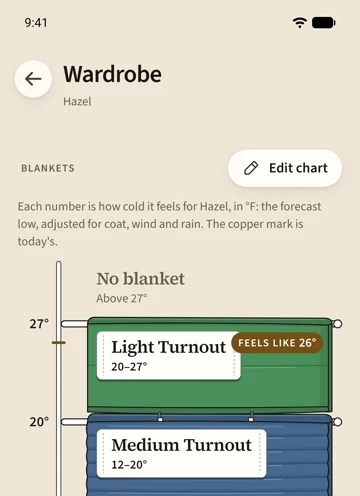
The Wardrobe is the horse's chart. Each blanket hangs from a line: the felt temperature where it goes on. Above the top line is No blanket. Where a blanket carries a liner, its lower part is marked Lined below. The copper mark shows today's felt low, so you can see today's pick in the chart itself.
Edit chart lets you drag a line a degree at a time and tap a blanket to take it off the chart or put it back from the shelf. Save keeps the new chart; Cancel throws the edit away.
Add a blanket
Tap Add a blanket. Pick a colour, a weight from sheet to heavy, and whether it is a turnout or a stable blanket; the name writes itself and you can change it. A new blanket lands on the chart where its weight suggests. The colour is how you will recognise the blanket everywhere: on the chart, on the outlook, and on the horse in the scene.
Extras
A hood or neck cover goes on with the blankets you choose, from a felt temperature you set, in the wet, or either. The Blankets home names it beside the pick, and the horse in the scene wears it.
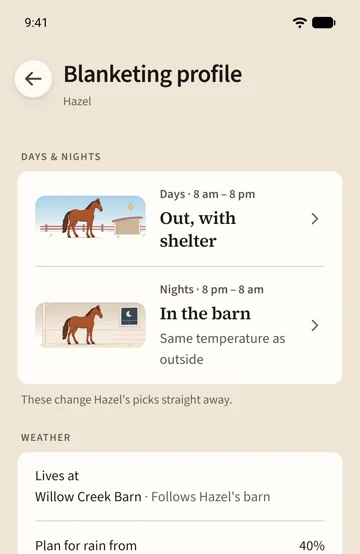
The Blanketing profile
Days & nights is where the horse spends each half of the day: out, out with shelter, in the barn, and how warm the barn is. Changing these changes the picks straight away. Lives at is where the forecast comes from: the horse's barn by default, or a place you set for a horse that lives elsewhere. Plan for rain from is how likely rain has to be before the pick counts it. Coat & condition feeds setup; after a change, Saddle offers to review the chart.